How-To pin any folder to the taskbar in Windows 7:
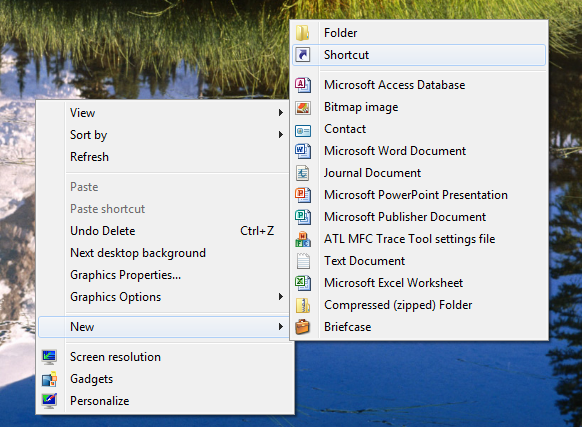
Right click on the desktop and then select “New” then “Shortcut”
In the dialog box that opens, enter the following command “C:\\Windows\\explorer.exe” then enter a space and the location of the folder that you want to open. An example of this would be “C:\\Windows\\explorer.exe D:\\Pictures” which would open the pictures directory on drive D:\\. After clicking Next, enter in the name of the shortcut that you are creating. This can be anything you would like.
The newly created shortcut will be on the desktop, right click on it and select “Pin To Taskbar”. The folder will now show up on the Taskbar and you can delete the shortcut that you created on your desktop.
This method can be modified to pin virtually any folder to the taskbar with its own button. If you would like to use different icons you can also change the icon of the shortcut before pinning it.
11/11/2011 Released new version that enables System Restore automatically if it is disabled.
Updated:: Due to a request, I have also made a command line version of this application so that it can be used in combination with batch files.
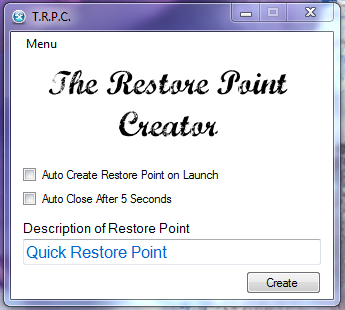
The Restore Point Creator (T.R.P.C.) is a handy utility that I made to quickly create restore points. To use the application simply open it, type the name of the restore point that you would like to use, and select Create. To make it more user friendly for those that would like to use it frequently with as little user interaction as possible, it can also auto create restore points. Placing a check mark in “Auto create restore points on launch” will automatically create a restore point when the application is opened. To auto close the application you can check “Auto close after 5 seconds”.
Compatible with: Windows XP, Windows Vista, Windows 7 Requires: .Net 2.0 License: Freeware
I typically do not publicly release applications that I make, but I was unable to find another one that makes the process this simple. Please let me know what you think!
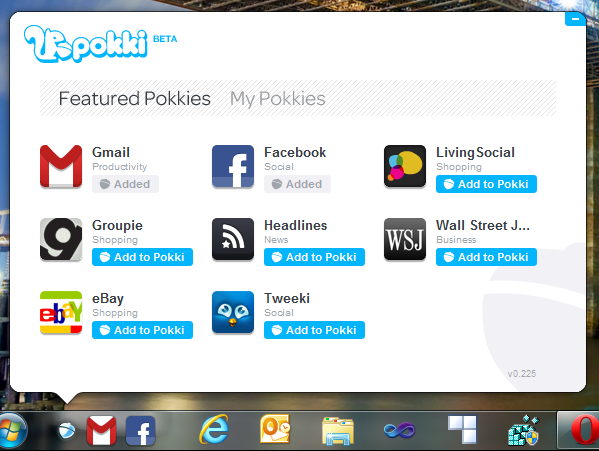
Pokki is a new application store that brings the applications to you that otherwise remain on the Internet. Made with HTML5, CSS, and Java Script, the applications are lite weight and at least at this point in time, easy on resources.
Windows has been in need of a application marketplace for many many years. The current methodology of finding applications is too cumbersome and quite lacking in control. While Pokki is limited right now in what it provides, they clearly have something here. After having been using it for a few hours I can confidently say that it will have some traction in the marketplace. I for one, will continue to use it.
Windows 8 promises even more HTML 5 integration and this could really be a gold mine for Pokki.
Today the Internet is abuzz about a new video released that shows some of the things they are working on for Windows 8. It showcases a pretty revolutionary interface (at least for Windows) that parallels Windows Phone 7. While I tend to be pretty critical when I see new operating system designs, I really like this one.
Here are my five things I revert too whenever I look at either Operating Systems or applications:
Less than 3 “clicks” to perform most operations
Easy navigation for those unfamiliar with it
Backwards and forwards compatibility
Hardware compatibility
Understandable and limited versions
When looking at Windows 8 I see it nailing every one of those points. The “new” interface is smooth, fast, universal, and more importantly, can be disabled. It is clearly designed for tablets and touch screen computers but at the same time Microsoft is cautious and understanding that like Netbooks, might just be a phase. At the same time a user is not locked into the tile interface. They can simply revert to the standard Windows 7 Superbar interface. Personally I see this as critical to the success of Windows 8. There are just some things that work and when they do, there is no reason to “Fix it”. The Superbar is one of those things.
A number of sites today are criticizing Windows 8 because Microsoft is not abandoning the old interface and saying that it is going to cause confusion with the multiple interfaces. These are the same sites that would criticize them for adding another “Tablet” version of Windows with only the tile interface. Microsoft has built its business off of compatibility and the ability to customize its software. This will give purchasers of Windows 8 the added benefit of using the OS on any device they choose and customize it according to the way they want to use it.
Strangely, Microsoft is almost channeling the old-school Linux way of thought, “use it the way you want and customize it the way you want”.
Windows 7 Search is not easy to use and the complete lack of documentation on it only serves to make it even more of a pain to use. The learning curve for it is particularly high due to the extremely limited user interface that it provides. Without at least some knowledge of where to start it is of little help to most people. These are some of the commands that I have found that work. If you have additional commands please add them in the comments below.
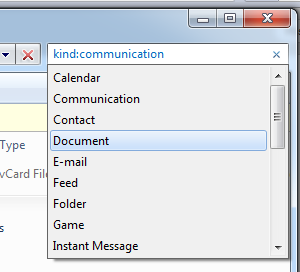
To use these commands begin by typing in the command below and when you have the syntax correct the color of the command will change to a light blue. Once the first part turns blue there will be a pop-down that will then let you click to select a secondary option if available. Once the secondary command has been selected it will look like this kind:=document. If you are searching for the contents of a document it will look like this contents:”how to use windows 7 search”. You must manually include quotation marks if the phrase or item you are searching for includes spaces.
Calendar Communication Contact Document Email Feed Folder Game Instant Message Journal Link Music Movie Note Picture Program Recorded TV Saved Search Task Video Web History
Music specific search keywords bitrate: artist: album: genre: lyrics: track: year:



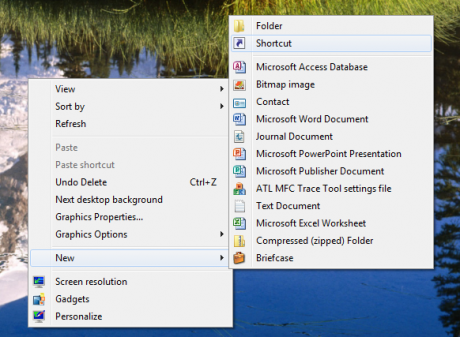 In the dialog box that opens, enter the following command “C:\\Windows\\explorer.exe” then enter a space and the location of the folder that you want to open. An example of this would be “C:\\Windows\\explorer.exe D:\\Pictures” which would open the pictures directory on drive D:\\. After clicking Next, enter in the name of the shortcut that you are creating. This can be anything you would like.